







call us: 020 7394 2529
fast, secure and confidential
data recovery services
in london
  • All Makes / Models of hard drives
  • All Operating Systems / File Systems
  • Photos / Music / Video Recovery
Free initial consultation

Synology NAS Data Recovery in London

Crashed volume, failed disks or a rebuild gone wrong? We recover data from every Synology DiskStation and RackStation.


Synology recovery specialists


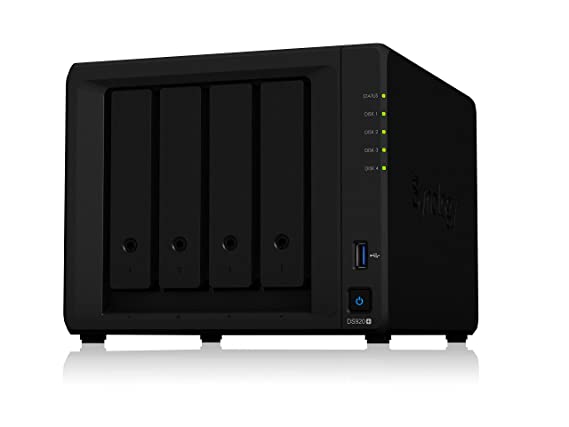
[caption id="attachment_5085" align="alignright" width="313"]London Synology Data Recovery Synology Data Recovery by Creative IT[/caption]

Synology NAS devices are used everywhere, from home photo libraries to office file servers and video studios. When a volume crashes, several disks fail or DSM reports the storage pool as unusable, your data is still usually on the disks. Data Doctor recovers Synology NAS systems at our London lab, starting with a free initial consultation. A Synology RAID 5 NAS recovery is £650 + VAT.


yellow shield icon

arrow hitting a shooting target icon

Synology problems we recover

  • “Volume crashed” or storage pool degraded or unusable.
  • Multiple disk failures in SHR, SHR-2, RAID 1, RAID 5, RAID 6 and RAID 10.
  • Failed repairs or expansions after replacing or adding disks.
  • NAS not booting or not found on the network after a DSM update.
  • Btrfs or ext4 file system corruption.
  • Deleted shared folders and accidentally reset units.
  • Ransomware that encrypted files on the NAS.


Highest success rates in hard drive data recovery


All Synology models

We recover every DiskStation (DS series) model from 1-bay units such as the DS118 up to multi-bay business units, plus RackStation (RS series) models such as the RS818RP+. Disks from any manufacturer, including NAS drives and SSD caches, are supported.

For a wider guide, read Synology NAS data recovery and support.

How we recover a Synology NAS

  1. Free initial consultation, then diagnosis – we test each disk and review the pool and volume layout.
  2. Imaging – every disk is cloned; failed disks are repaired first.
  3. Reassembly – the SHR or RAID layers, LVM and Btrfs/ext4 volume are rebuilt from the images.
  4. Extraction and checks – your shared folders are copied out and key files verified.

Your original disks are never written to, so nothing is lost if a first approach doesn’t work.

Choose your Synology model

Each page lists every model in that range, and we recover all Synology units – just call us if yours isn’t listed.

Before you send your NAS

  • Don’t click “Repair”, create a new pool or reinstall DSM.
  • Don’t swap disks around or add new ones.
  • Power the NAS down and label each disk with its bay number.
  • Send only the disks, unless we ask for the enclosure – for example, for encrypted shared folders.

Prices

  • Initial consultation: Free – tells you whether the fault is physical or logical and the best recovery method. Doesn’t include opening the drive in a clean room or any recovery attempt.
  • 2TB NAS (1TB + 1TB) with one drive to repair: £450 + VAT
  • QNAP or Synology RAID 5 NAS: £650 + VAT

All prices exclude VAT. See our full data recovery price list.


Frequently asked questions

Can you recover a crashed Synology volume?

Yes, in most cases. A crashed volume usually means a disk or metadata problem that we can work around by rebuilding the pool from disk images.

Do you recover encrypted Synology shared folders?

Yes, if you can provide the encryption key or passphrase.

How long does Synology recovery take?

Diagnosis typically takes 24–48 hours. Most recoveries are completed within a few working days depending on capacity and damage.

Should I try Synology’s repair option first?

No, not if the data matters. A repair or rebuild on a pool with weak disks can make things worse. Image the disks first – or send them to us.


Related services

Book your free consultation

Call 020 7394 2529, email [email protected] or visit our lab at Unit 1, The Willows, 80 Willow Walk, London SE1 5SY (Monday–Saturday, 9am–6pm, free customer parking). You can also book a pickup or request a quote online.